
You open your website on a Monday morning and something is wrong. Maybe the page redirects to a strange site, maybe a customer phones to say Google shows a warning, or maybe you simply cannot log in any more. If your website was hacked, the short answer is this: do not panic and do not delete anything yet. Change your passwords, take the site offline for a short time, check that you have a clean backup, then scan and clean the site.
The goal is to stop the damage first, then find out how the attacker got in, then close that door. You can do much of this yourself, but a hacked site often has hidden leftovers, so many owners in Innisfil, Barrie and across Simcoe County choose to have someone look at it. This guide walks you through the whole thing in plain words.
Check the Signs Your Website Has Been Hacked
Before you act, make sure it really is a hack and not a simple glitch. Hacks come in many forms, and some are quiet on purpose. The attacker may want your visitors, your search ranking or your server, not your attention.
Common signs you can see
- Your pages redirect to a site you do not recognize.
- Strange pages, ads or pharmacy and gambling links show up on your site or in your Google results.
- Google or your browser shows a red warning that the site is unsafe.
- You are locked out, or your password no longer works.
- There are admin users on your WordPress site that you never created.
- Your hosting company tells you the site is sending out spam or using too many resources.
Does my website have malware? How to check
A free online malware checker can scan your public pages and tell you if they match known bad code or are listed as unsafe. That is a useful first look, but it only sees what a visitor sees. Malware that hides in the files on your server, or only shows itself to people arriving from Google, can slip past.
So treat a clean result as good news, not proof. If you still see odd behaviour, a deeper website analysis for malware means looking at the files, the database and the user list, not just the front page.
Your Website Hacked Today? Do These Things in Order
The order matters. Doing things out of sequence can lock you out, erase evidence or let the attacker back in a minute later.
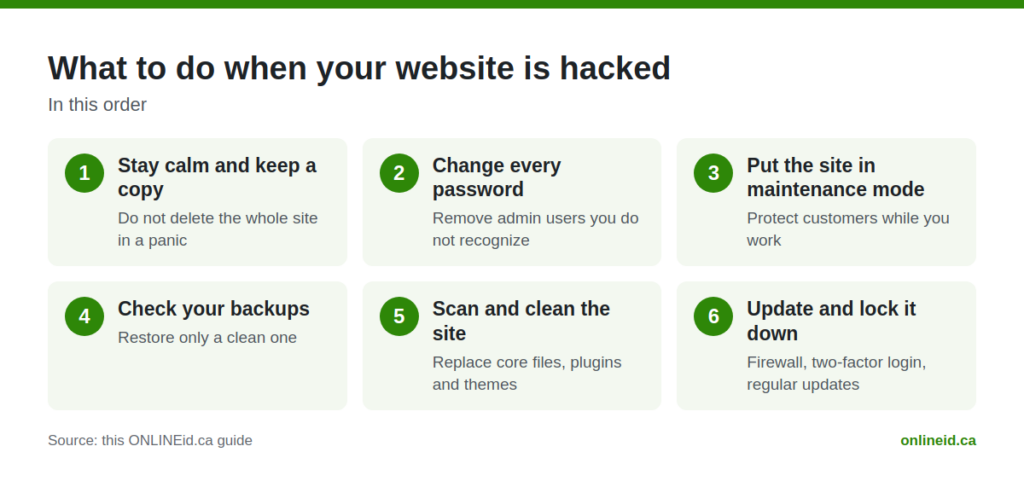
Stay calm and keep a copy
Do not delete the whole site in a panic. Ask your host to make a copy of the site as it is now, or download one if you can. That copy helps you work out what happened, and it keeps your content safe if something goes wrong during the cleanup.
Change every password
Change the passwords for your website admin, your hosting account, your database, your FTP or file access, and the email address tied to your accounts. Use a long, different password for each one. If you are on a computer that might be infected, do this from a different, clean device.
While you are there, remove any admin users you do not recognize. An attacker often adds a hidden admin so they can walk back in after you have changed your own password.
Put the site in maintenance mode
Take the site offline briefly, or show a simple maintenance message. This protects your customers from landing on a harmful page, and it stops your site from being used to spread spam or malware while you work.
Check your backups
Find your most recent backup from before the problem started. Be careful here: restoring a backup that already contains the hack just brings the hack back. If you are not sure when it began, a person should look at the files before you restore anything. Our guide on a simple website backup and recovery plan explains how to keep clean copies ready for next time.
Scan and clean the site, then update and lock it down
This is the longest part, and it is covered in the next section. The short version: remove the bad files, replace the core software with fresh copies, update everything and close the weak spot.
Clean Up a Hacked WordPress Site
Most small business sites in Ontario run on WordPress, which is also why it is such a common target. The software itself is solid when it is kept up to date. Problems usually come from old plugins, old themes, weak passwords or nulled (pirated) add-ons.
Replace the core files, not just the obvious ones
Attackers rarely leave one bad file. They tuck small bits of code into theme files, upload folders and even the database. The safest approach is to reinstall a fresh copy of WordPress core, then reinstall every plugin and theme from a trusted source instead of patching what is there.
Look in the places people forget
- The uploads folder, where there should be pictures and documents but no code files.
- Scheduled tasks that quietly reinstall the malware.
- The list of admin users and any new accounts.
- Plugins and themes you no longer use. Delete them, do not just switch them off.
Deal with the warning from Google
If Google flagged your site, you will need to ask for a review once the cleanup is finished. Do this only after you are sure the site is clean, or the warning can come right back. If spam is a symptom for you, it may also explain why enquiries have stopped arriving. See our post on why website emails and enquiries land in spam for the email side of the story.
Tell the people who need to know
If customers could have been affected, for example by a login form or an online order, tell them plainly what happened and what you did about it. A short, honest message goes a long way with neighbours who trust your business.
Stop It From Happening Again
A cleanup that does not fix the cause is just a pause. Once the site is clean, the work is to make it hard to get into and quick to recover.
Keep everything updated
Updates are the boring chore that stops most attacks. Core, plugins and themes all need regular attention, and old software that nobody updates is the easiest way in. That is the heart of good website maintenance and hosting: someone is watching, updating and keeping backups so you do not have to.
Use a firewall and strict logins
A firewall blocks a lot of bad traffic before it reaches your site. Two-factor login means a stolen password alone is not enough. Here is what we set up on the sites we build:
On our sites: the Wordfence firewall, the visitor’s real address read through Cloudflare, two-factor login for every admin, XML-RPC blocked and strict lockouts after failed logins.
In plain words, that means the firewall can see who is really knocking, bots that guess passwords get shut out quickly, and an admin account is not enough to get in without a second step. None of this makes a site unbreakable, but it closes the doors that are used most often.
Choose hosting that helps you
Cheap hosting that never updates its servers or keeps backups leaves you exposed. If you are weighing options, read about how to choose WordPress hosting in Canada before you decide where your site lives.
Know When to Call for Help
Some owners clean a hacked site themselves and do well. Others reach a point where the malware keeps coming back, the site will not load, or they simply do not have the time. A hack in the middle of a busy week is a bad moment to learn WordPress file structure.
If that is you, our website help covers hacked sites, updates, backups and hosting for businesses in Innisfil, Alcona, Lefroy, Cookstown, Bradford West Gwillimbury, Orillia, Newmarket, Aurora and the wider GTA. Here is how the cost works: Website help: the first look is free, then a price for the fix before any work starts.
That means you find out what is wrong and what it will cost before you agree to anything. There is no surprise bill after the fact.
Questions Owners Ask
Can I just restore a backup and be done?
Sometimes, but only if the backup is from before the hack and you also fix how the attacker got in. Otherwise the same weak plugin or password lets them back in. Restore, update everything, change every password, then check the user list.
Will I lose my Google ranking?
A hack can cause Google to warn visitors or drop pages, especially if spam pages were added. Cleaning the site quickly and asking Google to review it gives you the best chance of recovering, but nobody can promise how fast or how far results will come back.
Is my website hacked or just broken?
If the site shows a blank page or an error but nothing looks strange, it may be a broken update or a hosting issue. If you see redirects, new admin users, unknown pages or warnings from Google, treat it as a hack. When you are unsure, it is safer to act as if it is one.
Do small businesses really get targeted?
Yes. Attackers rarely pick a business by name. They use automated tools to find any site with an old plugin or a weak login, so a local restaurant, shop or contractor is just as reachable as a large company.

Get a Second Pair of Eyes on Your Site
If you think your website has been hacked, or you just want to know it is safe, we are glad to look. Book a free consultation with ONLINEid.ca and a team member will look at your business and make a plan with you. You can book a free consultation here, or call our A.I. answering line at (289) 807-6364, which answers any time and puts you through to the team.