
It is Sunday evening and a first-time buyer has just heard your name from a neighbour. They pull out their phone, search for you and tap the first result. If that page loads slowly, looks dated or hides your phone number, they are one tap away from the next agent.
Good realtor website design comes down to a few plain things: a fast site that shows who you are and where you work, makes it easy to contact or book you, and gives buyers and sellers a reason to come back. In Ontario, ONLINEid.ca builds a custom Realtor Website for $150, with a blog publisher plus contact and booking forms. The rest of this post explains what to put on it and what to watch for.
Start With What a Realtor Website Has to Do
Your website is not a brochure. It is the place where a stranger decides whether you feel trustworthy enough to call. Everything on it should help with that decision.
Most people look at a site on their phone first, so the phone version matters more than the desktop one. Open your own site on your phone right now and ask three questions. Can I see who this is within a few seconds? Can I tell which communities this agent serves? Can I reach them with one tap?
Keep the Goal Simple
A realtor site has two jobs. It helps a buyer or seller get to know you, and it gives them an easy next step. Pages, sliders and widgets that do not serve those two jobs are usually clutter.
Show Who You Are and Where You Work
Clients hire a person, not a logo. A clear photo of you, a short and honest bio and the areas you actually work in do more than any fancy design.
Name Your Communities
If you work around Innisfil, Alcona, Lefroy, Cookstown, Barrie, Bradford West Gwillimbury or Orillia, say so on the page, in normal sentences. The same goes for Newmarket, Aurora or the wider GTA. Local detail helps visitors see you know the streets, and it helps search engines understand where you work.
Build Trust Quietly
Real photos, a clear brokerage name, a licence line if you use one and genuine words from past clients (only with their permission) all help. Avoid stock photos of handshakes. For more on this, see how to build trust and credibility through your website design.
Make It Easy for Clients to Reach You
Some people want to call. Others would rather send a message at 10 at night or pick a time to talk. A good realtor site handles all of them.
Put Contact and Booking Forms Where People Look
A short contact form and a simple way to book a call or a showing consultation should be on your home page and your contact page, not buried. Ask only for what you need: name, phone or email and a short message. Every extra field costs you a few enquiries. If your form is not bringing in messages, these common contact form problems are worth a read.
Show Your Phone Number as a Tap-to-Call Link
On a phone, your number should be a button that dials when tapped. It sounds small, but it is one of the easiest wins on any local website.
Think About Where Enquiries Go
If you use a CRM, ask before the site is built how a form message will reach it. If you do not use one, make sure enquiries land in an inbox you check every day. A beautiful form that sends messages to an old email address is worse than no form at all.
Decide How You Will Handle Listings and MLS
Many agents search for an MLS website for realtors and assume the site must be a giant listing portal. It does not have to be. Your own listings, your recent sales and a few well-written neighbourhood pages can be plenty for a solo agent.
If you want live MLS listings on your site, talk to your brokerage first about what you are allowed to display and how. Rules about listing data come from your brokerage and board, not from the website builder.
What a Full Listing Site Looks Like
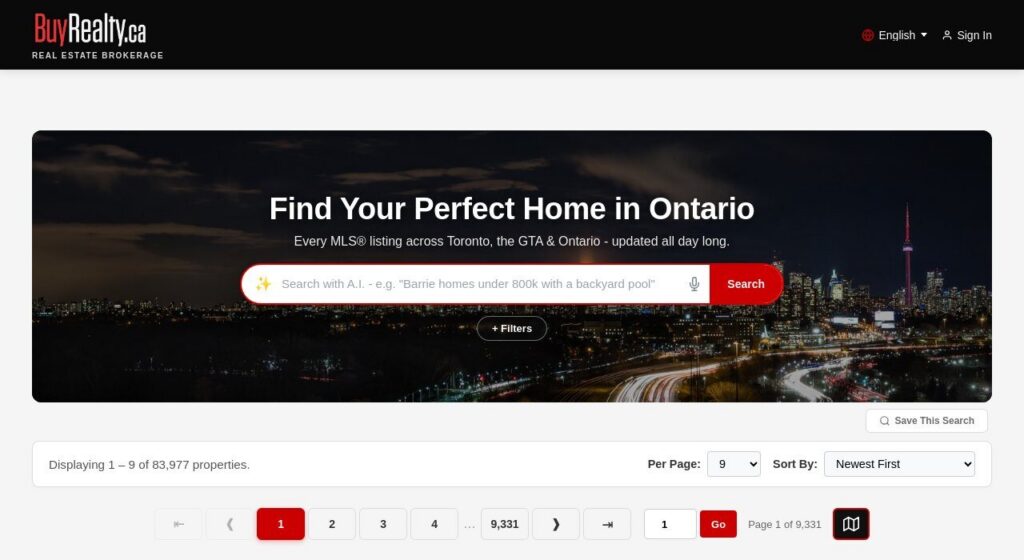
ONLINEid.ca built and hosts BuyRealty.ca, an Ontario brokerage site with every MLS listing, search in plain words, map search and many languages. It is a related business, so we know first-hand what a listing-heavy realtor site asks of a server and a design. Most agents will not need that scale, but it shows what is possible when the site is custom and not a template.
Think About AI and Search in Plain Words
More buyers now type a full question into a search box or an AI tool, such as “three bedroom house near the lake in Innisfil with a big yard.” Sites that answer those questions in clear language are easier for people and for search tools to understand.
Write the Way Clients Talk
Neighbourhood guides, a first-time buyer page and a short “how selling works in Ontario” page written in plain words all help. This is where a blog publisher earns its keep: you can post a market note or a local guide in a few minutes, without calling a developer. No one can promise rankings, but a site with clear, honest, local content gives search engines something real to work with.
If You Want an AI Feature
An AI realtor website can mean search in plain words, like the one on BuyRealty.ca, or a chat helper on your page. Ask what the feature does for your visitors and what it costs to keep running before you add it. A fast, clear site with a good contact form still comes first.
Fix a Slow Realtor Website
Realtor sites are photo-heavy, which is exactly why they get slow. One home page with large, unoptimized pictures can make a buyer on a phone give up before the page appears.
Look at the Usual Suspects
- Oversized photos: pictures uploaded straight from a camera or phone and never resized. Our guide on why photos and videos slow down your site covers the fixes.
- Too many add-ons: plugins and widgets that each load their own files.
- Cheap shared hosting: a crowded server that answers slowly even when the site itself is fine.
- Auto-playing video: a hero video that starts before the visitor has read a word.
Get a Second Opinion
If your site is slow, broken or just not doing its job, ONLINEid.ca offers website help: the first look is free, then a price for the fix before any work starts. You know the cost before anything changes.
Choose Between a Builder and a Custom Site
A realtor website builder or creator can get a page online fast. The trade-off is that many agents end up with a site that looks like every other agent’s, with limited control over speed, layout and what happens to your enquiries.
Why Custom Often Wins for Agents
A custom site is built around you: your photo, your areas, your style. It does not carry the weight of features you will never use. That usually means it loads faster and is easier to keep tidy. For a closer look at the difference, see why a DIY site can scare away local customers.
Do Not Forget Hosting
Realtor website hosting is part of the deal, not an afterthought. Ask who hosts the site, who updates it and who you call when something stops working. ONLINEid.ca looks after hosting and maintenance, so the same team that built the site keeps it running.
Get Ideas for Pages Worth Having
If you are hunting for realtor website ideas or a sample to copy, start with a short list of pages that actually help clients:
- A home page with your photo, your areas and one clear button to contact you.
- An about page with your story and your brokerage.
- A buyer page and a seller page that explain your process in plain words.
- Neighbourhood pages for the communities you work in.
- A blog for market notes, local news and answers to questions clients ask you every week.
- A contact and booking page that works well on a phone.
Once the site is live, look at what visitors actually do. This simple analytics dashboard guide shows you how to see which pages people use and which they leave.
See What a Realtor Website Costs in Ontario
Here are the real numbers, so you can plan:
- Free Consultation: free.
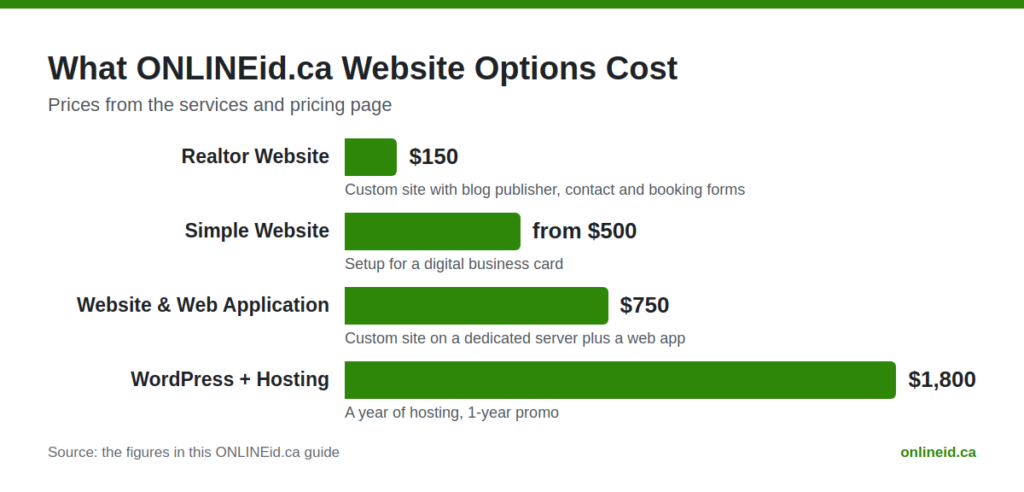
- Realtor Website: $150, a custom website with a blog publisher, contact and booking forms.
- Simple Website: from $500 setup, a professional online presence, a digital business card.
- Website & Web Application: $750, a custom website on a dedicated server plus a web app.
- WordPress + Hosting: $1,800 for a ready WordPress site with a year of hosting, a 1-year promo.
- Google Placement: $99, to get your business, contact details and website onto Google and Maps.
- Google Reviews add-on: $150, which shows your Google reviews on your site.
You can see everything in one place on our services and pricing page. If you are weighing options for any local business, our hub on small business websites is a good starting point.
Questions Owners Ask
Do I need a website if I already have a brokerage page?
A brokerage page is a start, but it is shared with every agent there and you do not control it. Your own site lets you show your personality, your local areas and your own contact and booking forms.
Can a realtor website show MLS listings?
It can, but check with your brokerage first about what you may display. Many agents do well with their own listings, recent sales and local guides, and leave the full listing search to a larger site.
Why is my realtor website slow?
The usual causes are oversized photos, too many add-ons and weak hosting. Our website help starts with a free first look, then a price for the fix before any work starts.
Is a Canadian realtor website different from one in the United States?
The design basics are the same, but the details are local. Use Canadian spelling, name your Ontario communities, show your brokerage and follow the advertising rules of your regulator and brokerage.

Book a Free Consultation
If your site is slow, out of date or missing altogether, a short conversation is the easiest place to start. A team member will look at your business and make a plan with you. Book a free consultation with ONLINEid.ca, or call our A.I. answering line any time at (289) 807-6364 and we will put you through to the team.