
You have a free evening, a coffee and a dozen browser tabs open, all promising you a website in an afternoon. Every one says it is the best. You just want something that makes your business look good and brings in a few more calls.
Here is the plain answer. The best website builder for small business in Canada is the one that matches what your site has to do. For a simple page with your hours and phone number, a DIY builder can be enough. If you want to be found on Google, take bookings, show reviews and not rebuild everything in two years, a custom or WordPress site built for you is usually the better choice. The rest of this post helps you tell which one you are.
Start With What Your Website Has to Do
Before you compare any builder, write down the jobs your website needs to do. A website is a tool, and the best tool depends on the work. Most local owners in Innisfil, Barrie, Orillia or the GTA need a short list of things.
Answer the Few Questions That Matter
- Do customers need to call you, book online or ask for a quote?
- Do you want to show up when someone nearby searches on Google?
- Will you update the site yourself, or do you want someone else to do it?
- Do you need extras like an events calendar, a members area or a listing search?
If you answer “just a simple page” to all of these, you have more choices and a smaller budget. If you answer yes to several, the cheap builder starts to cost more than it saves.
Think About the Next Two Years, Not Just Next Week
Many owners pick a builder for the first month and find it limiting by the sixth. They want a booking form, a better look or a page that loads faster, and the builder will not allow it. Moving a site later means doing the work twice, so it pays to think ahead before you start.
Understand What Free and Cheap Website Builders Really Give You
Searches like “best free website builder Canada” and “cheapest website builder Canada” are very common, and they make sense. When you are starting out, every dollar counts. Free and cheap builders have a real place, as long as you know the trade-offs.
Know Where the Cost Hides
A free plan often comes with the builder’s own name in your web address, ads or branding on your pages, and limits on what you can add. The paid plans that remove those limits are billed monthly or yearly, and the price often goes up once the first term ends. Read the renewal price, not just the sign-up price.
Also check what you are allowed to take with you. With some builders you cannot move your site elsewhere. If you grow out of it, you start again from nothing.
Count Your Own Time
A builder is cheap in dollars and expensive in hours. Writing the pages, choosing the photos, setting up the forms and making it work on a phone all land on you. If you run a salon or a plumbing company, that time is already spoken for. We wrote about the risk in why a DIY site can scare away local customers.
Look Honestly at AI Website Builders
Searches for a “small business website builder AI” or the “best AI website builder Canada” are growing fast. The idea is appealing: answer a few questions and get a finished site in minutes. These tools can be a useful way to get a first draft.
Use AI for a Draft, Not the Final Word
An AI builder does not know your street, your customers or what makes you different from the shop down the road. The words it writes tend to sound like everyone else’s. It may also get details wrong, such as services you do not offer or areas you do not serve. Always read every line and fix the facts.
Remember That a Fast Site Is Not the Same as a Found Site
Getting a site online is only the first step. People still need to find it, trust it and act on it. That takes local details, clear contact options and a proper Google listing. A quick draft does none of that on its own.
Compare the Three Real Options
When you strip away the brand names, small business owners in Canada really choose between three paths.
Option One: A DIY Builder
You pay a monthly fee, pick a design and fill in the pages yourself. It suits a very small business with a simple message and plenty of patience. It is the weakest choice if you need special features or want full control over your site.
Option Two: WordPress
WordPress is the most widely used way to build websites, and it can grow with you. You can add booking, forms, events and more. The risk is that a WordPress site with too many add-ons becomes slow, hard to maintain and open to security problems. How it is set up matters as much as the fact that it is WordPress.
Option Three: A Custom Site Built for You
A developer builds the site around your business, with no generic template. You get the features you need and nothing you do not, and someone else takes care of hosting and maintenance. It costs more up front than a free plan, but you stop spending your evenings on it. Our guide to choosing the best small business website design goes deeper on this.
Choose a Builder by Your Type of Business
People often search for the best website builder for salons, plumbers or churches. The tool matters less than getting the right pages and buttons for your kind of work.
Salons and Appointment Businesses
Your customers want to see your work and book a time. You need clear service pages, photos that load quickly and an easy booking form. A site that makes people phone during business hours loses the ones who browse at night.
Plumbers and Other Trades
Someone with a leaking pipe wants to call you now, or ask for a quote without a long conversation. A tap-to-call button and a simple quote form do most of the work. See why a click-to-call button matters so much to local customers.
Churches and Community Groups
Your site has to show service times, an events calendar, a map and a way to get in touch. Most of the content changes weekly, so it must be easy to update. Look for a setup where someone on your team can change an event without calling a developer.
See How We Build: DrX Plugins and Nothing Extra
ONLINEid.ca is an authorized developer for DrX, the WordPress plugins made by DoctorX (https://www.doctorx.ca). This site runs its booking, forms, SEO, mail, website assistant and A.I. answering line on DrX plugins; we cut this site down to DrX plugins plus Wordfence and removed 81 other plugins.
Why does that matter to you? Fewer plugins means fewer things that can break, slow the site down or clash with each other. It also means one place to look when something needs attention, rather than a pile of tools from a dozen different makers.
It works in practice, too. RoadhouseKFC.com, a Korean fried chicken restaurant in Innisfil, runs its events calendar on DoctorX Events. If you want to see how that kind of feature works, read our guide to adding an events calendar to your business website.
Know the Prices Before You Decide
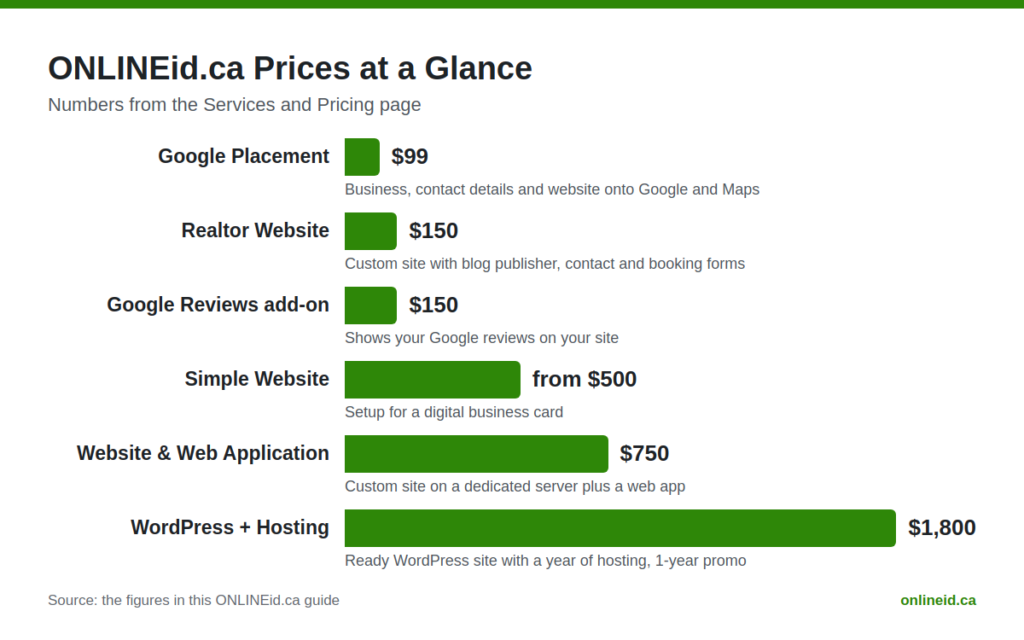
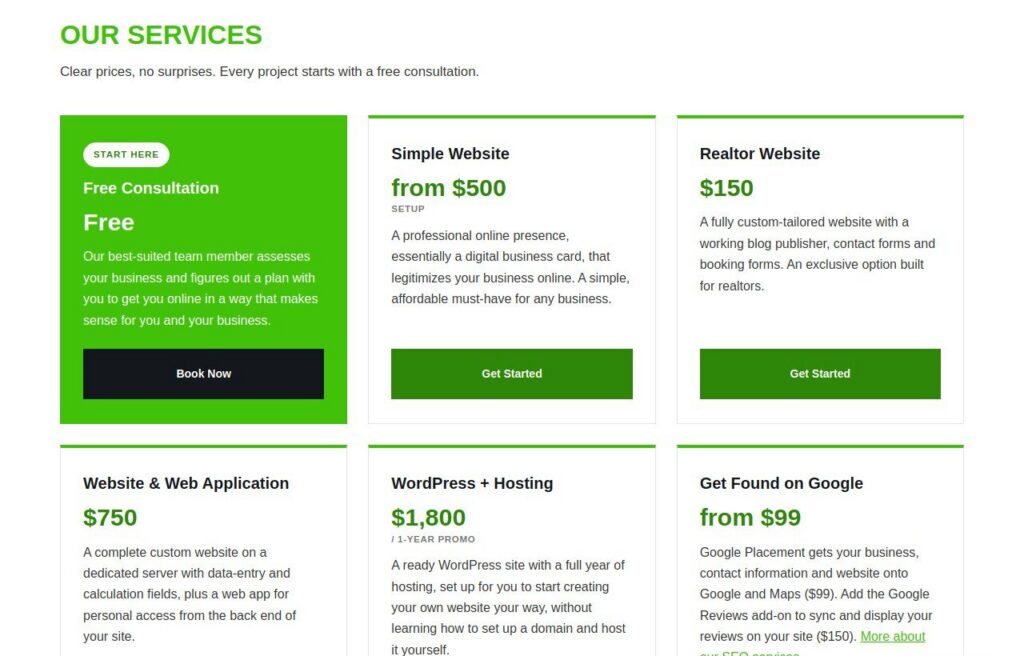
Builders hide their real cost behind monthly plans. We prefer to put ours on the table. Here are the numbers from our Services and Pricing page.
- Free Consultation: free.
- Simple Website: from $500 setup. A professional online presence, a digital business card.
- Realtor Website: $150. A custom website with a blog publisher, contact and booking forms.
- Website & Web Application: $750. A custom site on a dedicated server plus a web app.
- WordPress + Hosting: $1,800. A ready WordPress site with a year of hosting, a 1-year promo.
- Proxmox Server Setup: from $500, hardware not included.
- Google Placement: $99. Gets your business, contact details and website onto Google and Maps.
- Google Reviews add-on: $150. Shows your business’s Google reviews on your site.
Already have a site that is not working? Website help: the first look is free, then a price for the fix before any work starts. You know the cost before we touch anything.
Check These Things Before You Sign Up for Any Builder
Whichever way you go, run through this list first. It will save you headaches whether you build the site yourself or hire someone.
Ask About the Real Total Cost
Find the price after the first term, the price in Canadian dollars and the cost of anything you will need, such as a domain name, email, a booking form or extra pages. Add it up for a full year.
Ask Who Owns the Site and the Domain
Your web address should be registered in your name. You should be able to leave without losing your content. If you cannot get a straight answer, that tells you something.
Ask How It Works on a Phone
Most people search on their phone first. Open the demo on your own phone and try to call, find the hours and fill in a form. If it is awkward for you, it will be worse for a customer. If the contact form is part of your plan, see these common reasons a contact form gets no enquiries.
Ask How People Will Find You
A site no one finds does not help your business. Make sure your plan includes a Google listing and clear local details, like the towns you serve. Our small business websites page explains how a local site fits with everything else.
Questions Owners Ask
Is there a good free website builder in Canada?
There are free plans, and they can work for a hobby or a very simple page. For a business, expect limits like the builder’s name in your address, restricted features and pressure to upgrade. Treat a free plan as a trial, not a long-term home for your business.
What is the cheapest way to get a professional website?
The cheapest option in dollars is rarely the cheapest overall once you count your time and the cost of redoing it. Our Simple Website starts from $500 setup, and the first consultation is free, so you can see what fits before you spend anything.
Do I need hosting as well as a website builder?
Builders usually include hosting in the monthly fee, which is why you cannot easily leave. With WordPress, hosting is separate. Our WordPress + Hosting package is $1,800 and covers a ready WordPress site with a year of hosting, as a 1-year promo.
Can an AI builder replace a web developer?
It can give you a quick draft. It cannot know your customers, check your facts or set up your Google listing for you. Many owners use a draft as a starting point and then get help to make it right.

Talk It Through With a Real Person
Choosing the best website builder for a small business does not have to be a guessing game. Tell us what your business does and who you want to reach, and a team member will help you make a plan, whether that is a simple page or something bigger. Book a free consultation with ONLINEid.ca and we will point you to the option that fits.