

It is a Tuesday evening, you have just sat down for supper, and your phone buzzes. “Hi, how much to fix my deck?” You reply with a question about where the job is. Twenty minutes later you ask for a photo. The next morning you ask when they would like it done. By the time you have the basics, you have spent more time chatting than quoting.
If this sounds familiar, you are not alone. Many trades, salons and shops across Innisfil, Barrie and the GTA lose hours each week trading texts and calls just to learn the simple facts. A well-built website enquiry form for local business owners fixes that by collecting those facts before the conversation even starts.
Notice Where the Back-and-Forth Really Costs You
Each message on its own feels small. But a single enquiry can turn into a long thread of questions, missed calls and “I’ll get back to you” moments. Multiply that by every new customer, and it adds up to real hours you could have spent on the job, behind the chair or serving customers.
It also costs you in speed. When you are on a roof, in a client’s kitchen or in the middle of a haircut, you cannot answer straight away. The customer who did not hear back quickly may move on to the next name on the list.
A form does not replace your personal touch. It simply handles the repetitive first step, so that when you do reply, you already know what you are talking about.
Start With the Details You Need Before You Can Quote or Book
The best enquiry forms are built around your business, not copied from a generic template. Start by writing down the questions you ask almost every new customer. Those questions become the fields.
For most local businesses, the core details look like this:
- What they need: a short description of the job, service or product.
- Where they are: the town or address, so you know whether it is in your service area.
- When they want it: a rough date, a deadline or “as soon as possible”.
- How to reach them: a name, phone number and email, plus their preferred way to be contacted.
That is often enough to decide whether you can help and what to say next.
For Trades: Location and Scope Come First
If you are a plumber, electrician, landscaper, painter or contractor, location matters before anything else. A customer in Alcona and one in Newmarket are very different drives. Asking for the town up front lets you decide quickly whether the job fits your route.
Scope matters too. A field that asks “What needs to be done?” gives you a first look at whether it is a quick fix or a bigger project.
For Salons and Studios: Service and Timing
If you run a salon, barbershop, spa or studio, the key questions are which service the customer wants and when they are hoping to come in. You can even add a field for anything you should know ahead of time, such as hair length, a previous colour or a special occasion.
If you already take bookings online, a form can sit alongside that for customers who have a question first. Our post on why local service businesses in Simcoe County need an online booking system covers how the two work together.
For Shops: Product and Pickup Details
If you run a shop in Cookstown, Bradford West Gwillimbury or Orillia, customers often want to know whether you carry something, whether you can order it in, or when they can pick it up. A form with a field for the item and a preferred pickup day saves them a trip and saves you a string of phone calls.
Ask for Photos So You Can See the Job Before You Drive There
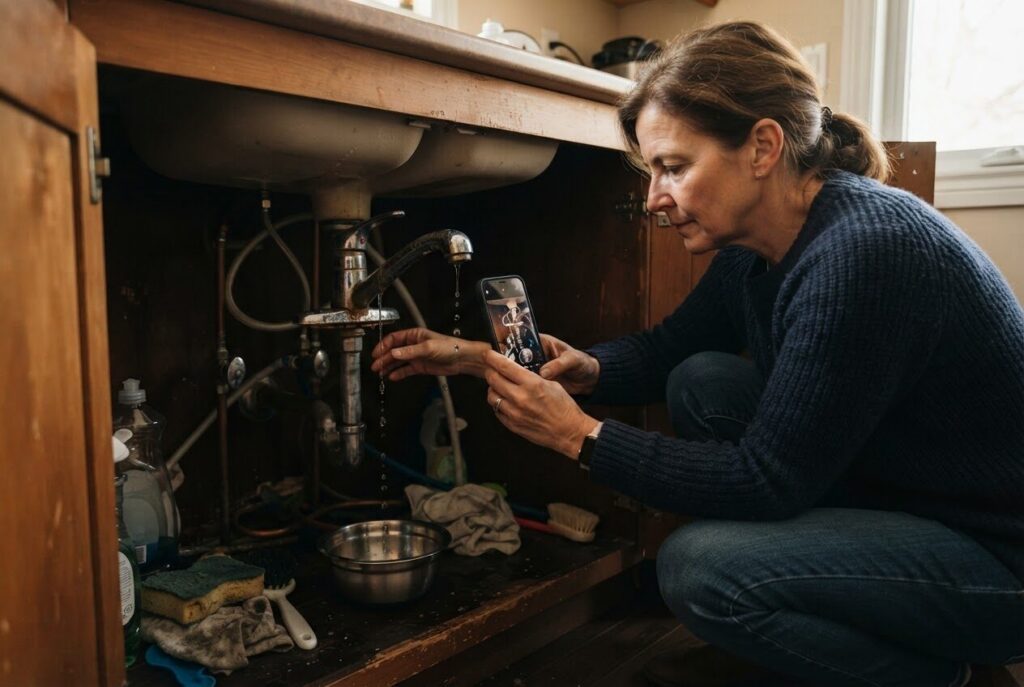
For trades especially, a photo is worth a long phone call. A picture of a leaking pipe, a cracked driveway, a tired fence or a messy basement tells you more in a few seconds than ten minutes of description.
Adding a photo upload to your form means customers can show you what they mean right when they enquire. You can often give a better first answer, bring the right tools, or tell someone honestly that the job is not a fit, all before leaving the shop.
Keep the photo field optional. Some customers will not have a picture handy, and you do not want to lose them. A simple note such as “A photo helps us give you a better answer” is usually enough to encourage it.
Make It Easy for Customers to Fill In From Their Phone
Most people search for local businesses on their phone first, and many will fill in your form from the driveway, the couch or a coffee shop line. So the form has to work well on a small screen.
That means big, tappable fields, clear labels and a button that is easy to find. It also means not asking people to type long answers when a short choice will do. A drop-down list of your main services, for example, is faster than typing from scratch.
When a custom website is built around how your customers actually behave, the form feels like part of the site rather than an afterthought. That is one reason we build custom websites and avoid generic templates.
Keep the Form Short and Friendly
It is tempting to ask for everything. Resist that. Every extra field is one more reason for a busy customer to give up and call someone else.
A good rule is to ask only what you need to give a useful first reply. You can always collect the finer details in the follow-up conversation. If you are unsure whether a field is worth keeping, ask yourself: “Would I really use this answer before I reply?” If not, leave it out.
A friendly tone helps too. Short, plain labels and a line like “Tell us a bit about what you need and we’ll get back to you” make the form feel like the start of a conversation, not a pile of paperwork.
Decide What Happens After They Press Send
A form is only as good as what happens next. Before you build it, decide who receives the enquiry, how quickly you want to respond, and what the customer sees once they submit.
A clear confirmation message goes a long way. Something like “Thanks, we have your details and will be in touch soon” lets the customer know their message did not disappear. If you have business hours, say so, so nobody is left wondering on a Sunday night.
It also helps to have your reply ready. Once you have the details, you can answer with a quote, a few follow-up questions or a suggested time, instead of starting from zero. If quotes are the heart of your business, our post on how a simple quote request form helps Simcoe County trades win more jobs goes deeper on that side of things.

Pair the Form With a Website People Can Actually Find
A great form does not help if nobody reaches it. Customers need to find your business first, whether through a search, a map listing or a friend’s recommendation.
That is why a form works best as part of a bigger picture. A clear website that explains what you do and where you work, plus a proper listing on Google and Maps, gives customers somewhere to land and something to act on. If you have not sorted out your listing yet, read about how a simple Google Placement gets your Simcoe County business on the map.
Nobody can promise exactly how many enquiries a website will bring in. But making it simple for the people who do find you to reach out gives your business a fair chance.
Build the Form Into a Simple Website or a Custom Site
You do not need a large or complicated website to get started. A Simple Website, a professional online presence that works like a digital business card, starts from $500 setup. It can include a form built around your own questions: what the customer needs, where they are, when they want it and a place to add photos.
If your business needs more, such as several service pages, booking, or a web application behind the scenes, we can build a custom website that grows with you. You can see the options and current prices on our Services & Pricing page.
We are based in Innisfil and work with businesses across Simcoe County and the GTA, from Barrie and Orillia to Aurora and Toronto. We also look after hosting and maintenance, so once the form is live you are not left wondering who to call if something needs a tweak.
Take the First Step Before the Next Late-Night Text
Think about the last few enquiries you received. What questions did you ask every time? What did you wish customers had told you up front? Those answers are the blueprint for your form.
You do not need to have it all figured out. In a free consultation, a member of our team will look at how your business works, talk through what you usually need to know from a new customer, and help you make a plan. If you would rather start with a call, our A.I. answering line at (289) 807-6364 answers any time and puts you through to the team.

Ready to spend less time trading texts and more time doing the work you do best? Book a free consultation with ONLINEid.ca and let’s build a website enquiry form that collects the details for you.